
Screening Form Audit Trail
Overview
The Screening Form Audit Trail gives you the full history of that form — the lead's original submission, plus any edits your research staff made afterward. Use it to confirm what a lead originally reported, and to see who changed what and when.
Understanding the audit trail
The audit trail lives on the lead's detail page under the Activities Log tab. Expand Screening Form Audit Trail to see every recorded change, newest first. A record count at the top tells you how many entries exist.
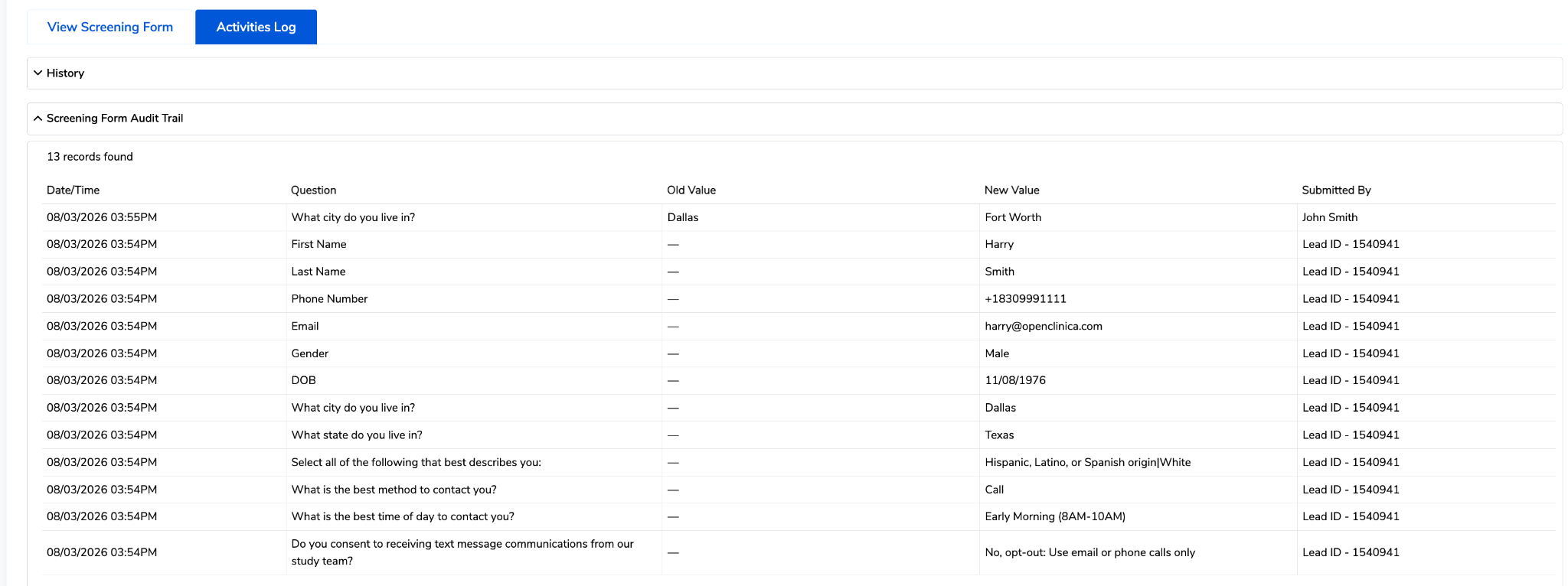
Tip: Edits most often happen during screening calls, when you confirm answers with a lead and catch a data entry error or a detail that has changed since sign-up. The audit trail keeps the original answer on record, so correcting a mistake never erases what the lead first reported.
How to view the audit trail
- Open the lead details page from your lead list.
- Click the Activities Log tab, to the right of View Screening Form.
- Expand Screening Form Audit Trail. Entries load newest first.
- Compare Old Value to New Value on any row to see exactly what changed.
- Check Submitted By to tell an original submission (Lead ID) apart from a staff edit (staff member's name).